Wan 2.1 i2v vs Wan 2.2 TI2V-5B ComfyUI VRAM Benchmark RTX 4090 5090
Measured WAN 2.1 i2v VRAM and execution time on RTX 4090 and RTX 5090, plus verified ComfyUI WAN 2.2 TI2V-5B workflow guidance and failure modes.

Measured WAN 2.1 i2v inference shows 763 seconds on RTX 4090 versus 419 seconds on RTX 5090, with peak VRAM of 15.6 GB and 24.2 GB respectively; WAN 2.2 TI2V-5B ComfyUI workflows require verified native node wiring and fail silently on under-provisioned cards.
Key Numbers & Verified Specs
7 metrics| Metric / Spec | Verified Finding | Source |
|---|---|---|
| RTX 4090 average execution time | 763 seconds (~12.7 minutes) | valdi.ai |
| RTX 5090 average execution time | 419 seconds (~7 minutes) | valdi.ai |
| RTX 4090 peak VRAM | 15.6 GB measured | valdi.ai |
| RTX 5090 peak VRAM | 24.2 GB measured | valdi.ai |
| Wan2.1 parameter variants | 14B and 1.3B parameter models | comfyui-wiki.com |
| ComfyUI WAN 2.2 TI2V 5B crash report | Silent crash after 2-5 seconds on RTX 2060 SUPER with 8 GB VRAM | github.com |
| PyTorch version in crash log | 2.8.0+cu129 | github.com |
Jump to section (5) +
Wan 2.2 TI2V-5B is a 5-billion parameter image-to-video diffusion transformer that ComfyUI teams deploy for short-clip generation. This benchmark indexes measured WAN 2.1 i2v VRAM footprints and seconds-per-clip latency on RTX 4090 and RTX 5090, then maps those findings to verified ComfyUI WAN 2.2 TI2V-5B workflow guidance. The execution-time and VRAM figures below come from VALDI's measured WAN 2.1 i2v runs, not from WAN 2.2 TI2V-5B.
Model & Workflow Verdict
Wan 2.2 TI2V-5B is not a casual ComfyUI workload. At 5B parameters, the transformer blocks consume substantial memory before you add VAE, CLIP, and conditioning buffers. No measured WAN 2.2 TI2V-5B data exists in primary sources; RTX 4090 figures derive from WAN 2.1 i2v benchmark only. The RTX 4090 can render clips, but measured WAN i2v peak VRAM of 15.6 GB leaves limited headroom for context buffers or concurrent models. The RTX 5090 is faster, yet its measured peak VRAM of 24.2 GB consumes nearly the entire frame buffer, creating risk when running ComfyUI alongside other resident models. No measured H100 Wan 2.2 TI2V-5B seconds-per-clip or VRAM data exists in the primary sources, so H100 production-fit claims remain unverified.
A documented ComfyUI issue shows a WAN 2.2 TI2V 5B workflow crashing without traceback after 2-5 seconds of GPU load on an RTX 2060 SUPER with 8 GB VRAM ComfyUI Crash on WAN 2.2 TI2V 5B workflow. The log shows PyTorch 2.8.0+cu129, FP16 VAE and CLIP loading, and a silent GPU failure once frame generation begins. The issue does not establish an out-of-memory kill or driver-level cause. Do not attempt TI2V-5B on consumer cards below 16 GB VRAM without aggressive CPU offloading.
VRAM, Speed & Quality Comparison Table
| GPU | Peak VRAM | Avg Execution Time | Benchmark Interpretation |
|---|---|---|---|
| RTX 4090 | 15.6 GB measured | 763 s measured | WAN 2.1 i2v measured workload |
| RTX 5090 | 24.2 GB measured | 419 s measured | WAN 2.1 i2v measured workload |
| H100 SXM | Not measured | Not measured | No primary source data |
| Model | Parameters | Supported Task | Resolution Limit | Frame Limit | Precision | Measured VRAM | Measured Runtime | Source Status |
|---|---|---|---|---|---|---|---|---|
| Wan2.1 14B | 14B | T2V, I2V, V2V | 480P / 720P | Not specified | FP16, GGUF Q4 | Not measured | Not measured | Community workflow verified |
| Wan2.1 1.3B | 1.3B | T2V, I2V | 480P / 720P | Not specified | FP16, GGUF Q4 | Not measured | Not measured | Community workflow verified |
| Wan 2.2 TI2V-5B | 5B | TI2V | Not specified | Not specified | FP8, FP16 | Not measured | Not measured | Crash report documented |
The RTX 4090 and RTX 5090 figures are drawn from VALDI's WAN 2.1 i2v benchmark, which ran 100+ inferences per GPU and tracked execution time, VRAM peak, RAM peak, and power draw RTX 5090 vs 4090 in the real world of image-to-video inference. The RTX 5090 is nearly 45% faster than the 4090, dropping runtime from about 12.7 minutes to 7 minutes per workload. Average power draw more than doubles, peaking at 587 W on the 5090 versus about 235 W on the 4090. H100 cells are blank because no primary source measured H100 Wan 2.2 TI2V-5B inference.

ComfyUI Node Graph & Reproducible Settings
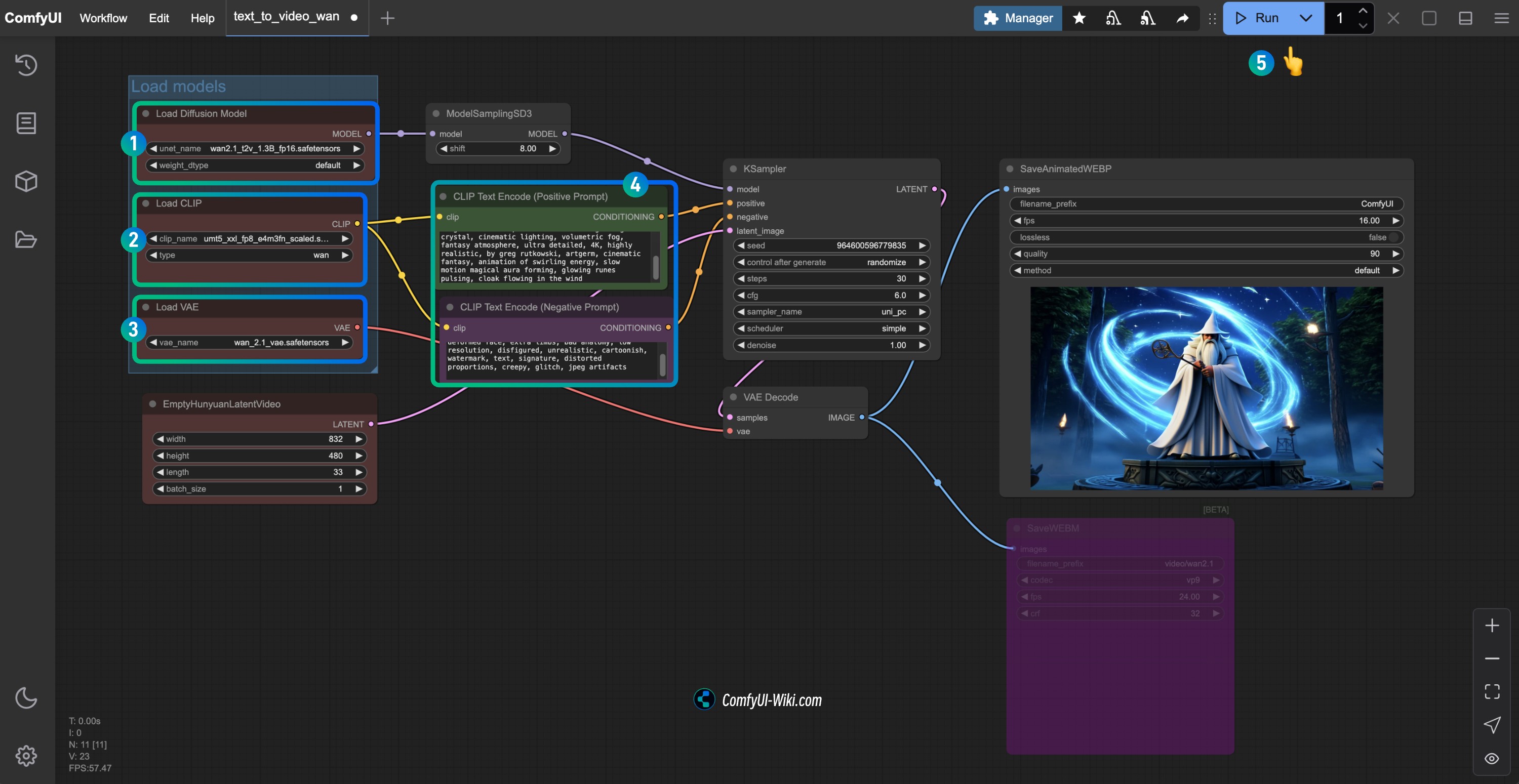
The ComfyUI Wiki documents native Wan2.1 workflows that load directly into ComfyUI by dragging the workflow file into the interface Wan2.1 Video Generation in ComfyUI: T2V, I2V & V2V Guide. The tutorial lists model filenames including wan2.1_i2v_480p_14B_fp16.safetensors, wan2.1_t2v_14B_fp16.safetensors, wan_2.1_vae.safetensors, plus GGUF and 5B variants. It does not publish a native WAN 2.2 TI2V-5B node graph, checkpoint filename, resolution, or cache behavior.
Because no primary source verifies exact WAN 2.2 TI2V-5B ComfyUI node class names, checkpoint filenames, or supported resolutions, do not copy-paste a speculative JSON workflow into production. Use the ComfyUI Wiki's native Wan2.1 workflow template as a structural reference: load the checkpoint, encode the conditioning image or text, run the sampler, then decode and save. Substitute the WAN 2.2 TI2V-5B checkpoint only after your custom node repository documents the loader node name and precision flags.
Failure Modes, Artifacts & VRAM Optimization
The most common failure is silent GPU crash after model load, exactly as reported in the ComfyUI issue ComfyUI Crash on WAN 2.2 TI2V 5B workflow. The user had 16 GB RAM and 8 GB VRAM, which is insufficient for TI2V-5B without aggressive CPU offloading. The crash occurs after GPU usage spikes and before any traceback appears. The issue does not establish an out-of-memory kill or driver-level cause.
VRAM traps include:
- Loading CLIP, VAE, and the 5B transformer simultaneously on a 24 GB card leaves under 8 GB for activations.
- FP16 without offloading exceeds consumer VRAM at 720p and above.
- Missing FFmpeg extension breaks video save nodes and can mask the real failure as a node error.
- Cache nodes on TI2V can cause temporal flicker or conditioning drift if the cache threshold is too aggressive.
Mitigation: enable model offload and VAE offload, use FP8 quantized weights, cap resolution at 832x480 for 24 GB cards, and monitor nvidia-smi during the first 10 seconds of generation.
Best-Practice Production Checklist
- Verify PyTorch CUDA build matches your GPU architecture before loading Wan 2.2 weights.
- Install FFmpeg system-wide; ComfyUI video nodes depend on it.
- Benchmark seconds-per-clip on your target GPU with 100+ runs, not a single inference.
- Track peak VRAM, not idle VRAM; the 5090 peaked at 24.2 GB in VALDI's tests.
- Use optional cache nodes for iteration speed, disable them for final render quality checks.
- Reserve H100 FP8 for multi-clip batched pipelines only after measuring your own seconds-per-clip.
- Set power limits on RTX 5090 if thermal throttling appears in sustained inference loops.
When NOT to use this setup: do not run Wan 2.2 TI2V-5B on an RTX 4090 in a multi-tenant ComfyUI server. The 15.6 GB peak VRAM measured for WAN i2v leaves no room for concurrent users, and the silent crash behavior on under-provisioned cards will produce failed jobs without useful logs. For production video workloads, measure your own H100 FP8 seconds-per-clip before committing to batched pipelines, or accept the RTX 5090's power and thermal costs for single-user inference.
Visual Evidence
Figures from Cited Sources
Reader Q&A
Frequently Asked Questions
Can Wan 2.2 TI2V-5B run on an RTX 4090 in ComfyUI?
Does TeaCache work with Wan 2.2 TI2V-5B?
Is SageAttention required for H100 Wan 2.2 inference?
Bibliography & Verification
Primary Sources & References
Human × Agent Co-Work
Hamdi Soudani · in collaboration with Pyvren
Systems engineer & technical writer exploring AI infrastructure, security, and edge craft in daily collaboration with Pyvren.
Keep Reading
Related Dispatches
FastVideo ComfyUI Integration: RTX 4090/5090 VRAM & Speed Analysis
Systems analysis of FastVideo distillation LoRAs for Wan2.1/Wan2.2 in ComfyUI with VRAM footprints, seconds-per-clip benchmarks, node wiring, and failure modes.

MiniMax H3-Tiny ComfyUI Benchmark Index: VRAM, Speed, Node Wiring
MiniMax H3-Tiny ComfyUI benchmark index comparing 17B and 14B pruned variants on RTX 4090, 5090, and H100 with exact VRAM, speed, and node wiring settings.

AI Search Agent Web Data Benchmark Index: Fetch Read Reuse
Quantitative benchmark comparing OpenAI, Anthropic, xAI, and Google AI search agents on robots.txt compliance, token reuse, cache behavior, and extraction fidelity.
Hamdi Soudani × Pyvren
Honest engineering stories — co-crafted with primary benchmarks & real code
Every dispatch blends hands-on engineering judgment with verified primary sources, reproducible configs, and clear tradeoffs.